
The Complete Guide to API Rate Limiting: Best Practices for 2026
API rate limiting has become essential for maintaining stable, secure, and performant web services. As APIs power everything from mobile apps to enterprise integrations, controlling request flow prevents system overload and ensures fair resource distribution among users.

This guide covers everything you need to know about implementing effective API rate limiting in 2026. You'll learn about different algorithms, implementation strategies, and best practices that protect your infrastructure while maintaining excellent user experience.
What is API Rate Limiting?
API rate limiting controls how many requests a client can make to your API within a specific time window.

Think of it as a traffic control system that stops any single user or application from overwhelming your servers with too many requests.
When a client exceeds the allowed request rate, the API typically responds with a 429 "Too Many Requests" status code. This mechanism protects your backend services from abuse, accidental overuse, and malicious attacks.
Rate limiting works by tracking requests from individual clients, usually identified by API keys, IP addresses, or user accounts.
The system maintains counters that reset at regular intervals, allowing clients to make requests up to their allocated limit.
Why API Rate Limiting Matters
Your API faces constant pressure from various sources.
Without proper rate limiting, a single misbehaving client could consume all available resources, leaving legitimate users unable to access your service.
Resource Protection
Rate limiting prevents server overload by capping the number of concurrent requests. This protection extends to your database, external services, and computational resources that power your API responses.
Cost Control
Many APIs rely on third-party services that charge per request. Rate limiting helps control these costs by preventing runaway usage that could result in unexpected bills.
Security Enhancement
Rate limiting serves as your first line of defense against brute force attacks, credential stuffing, and other malicious activities that rely on high-volume requests.
Fair Usage
By implementing rate limits, you ensure that all users get equitable access to your API resources. This prevents a few heavy users from degrading performance for everyone else.
Common Rate Limiting Algorithms
Choosing the right rate-limiting algorithm depends on your specific requirements for burst handling, memory usage, and implementation complexity.
Token Bucket Algorithm
The token bucket algorithm allows controlled bursts while maintaining an average rate limit.
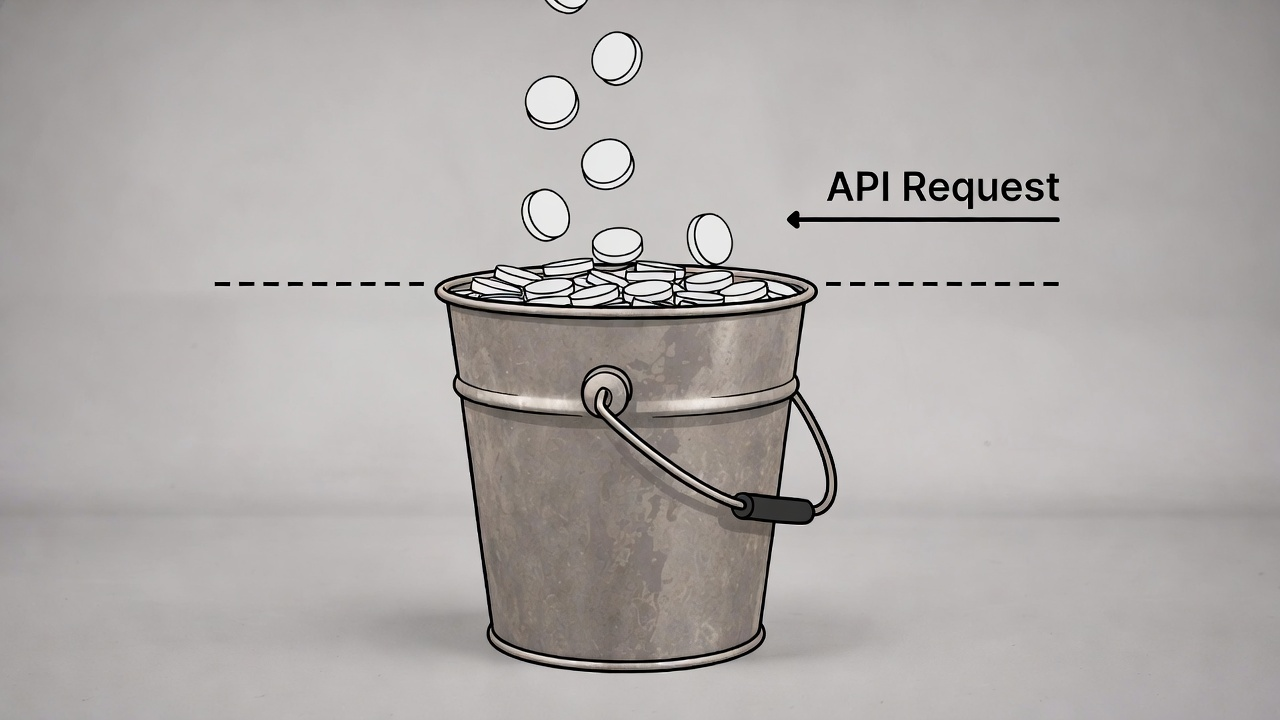
Imagine a bucket that holds tokens, with new tokens added at a steady rate until the bucket's capacity is reached.
Each API request consumes one token.
If tokens are available, the request proceeds. If the bucket is empty, the request gets rejected or queued.
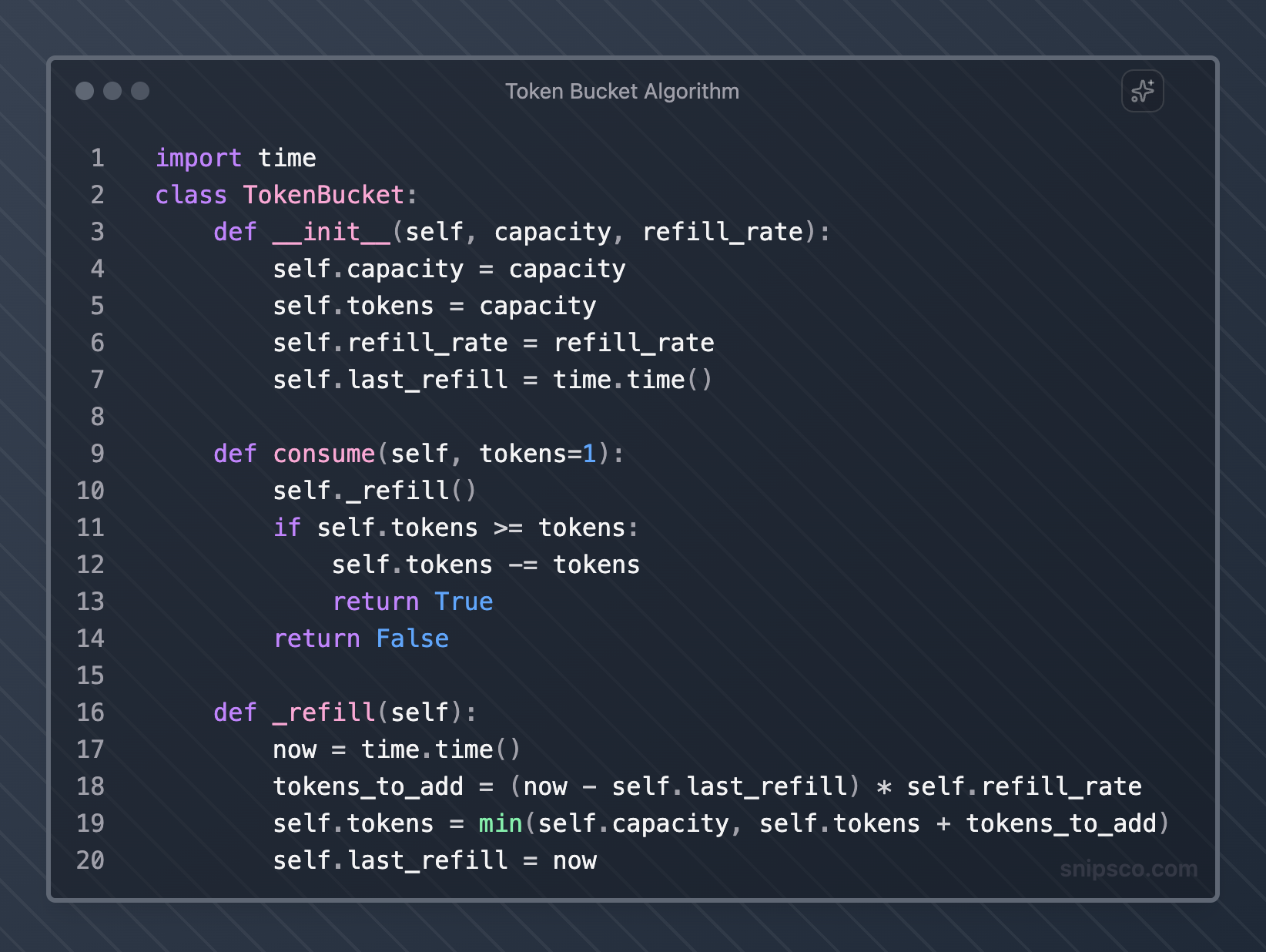
This algorithm works well for APIs that need to handle occasional traffic spikes while maintaining long-term rate control.
Leaky Bucket Algorithm
The leaky bucket algorithm processes requests at a constant rate, regardless of input rate.

Requests enter the bucket and get processed at a steady pace, with overflow requests either rejected or queued.
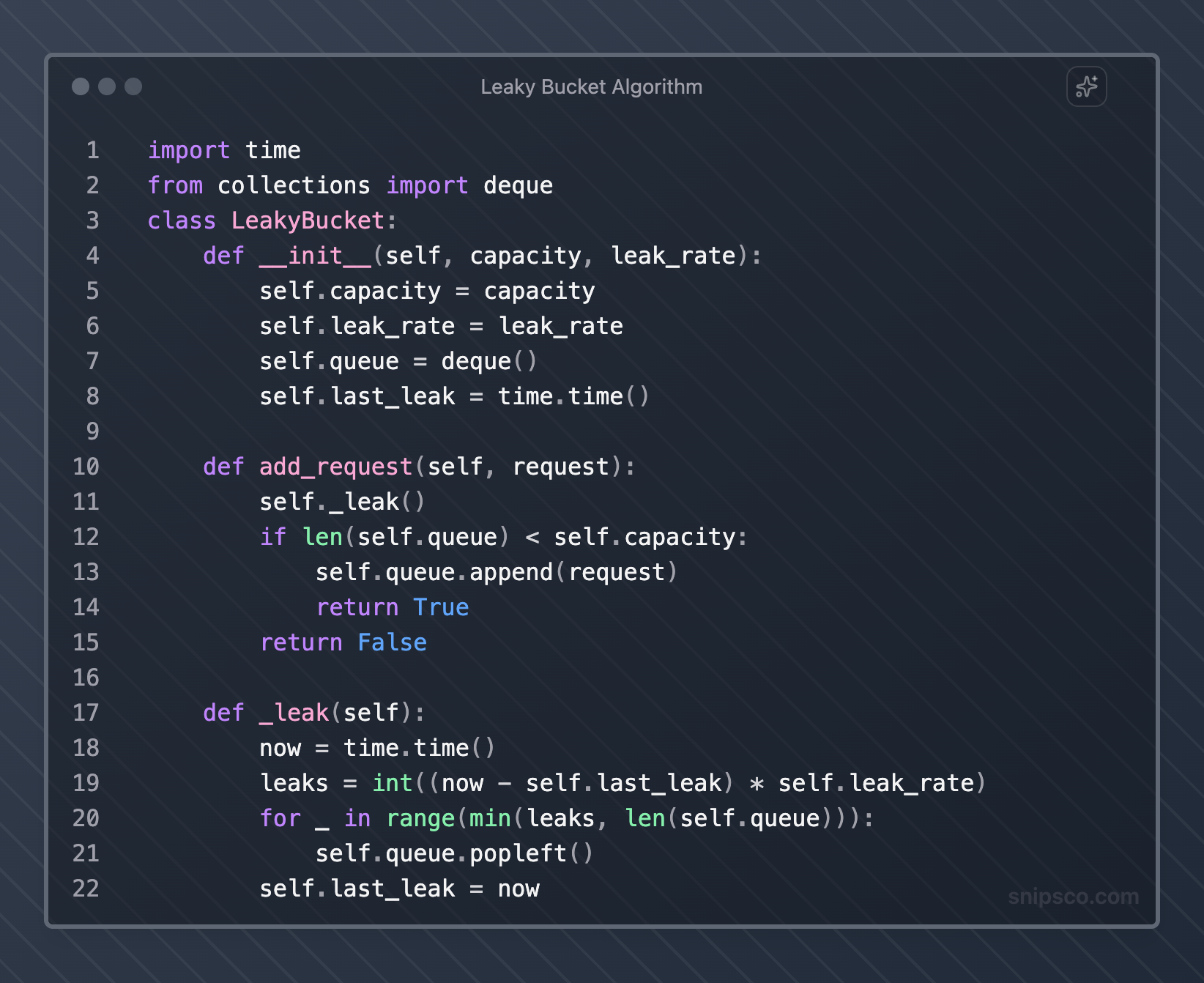
This approach provides smooth request processing but may not handle burst traffic as flexibly as token bucket implementations.
Fixed Window Counter
A fixed window counter divides time into fixed intervals and counts requests within each window.
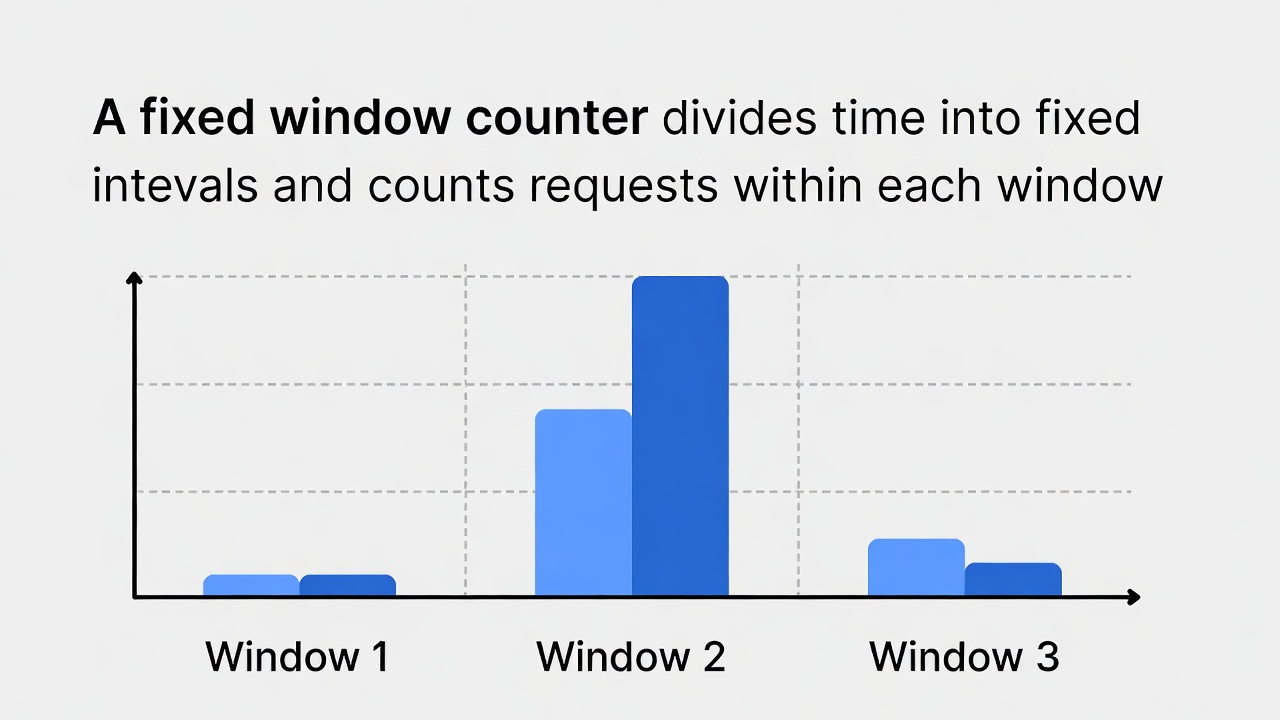
When a window expires, the counter resets to zero.
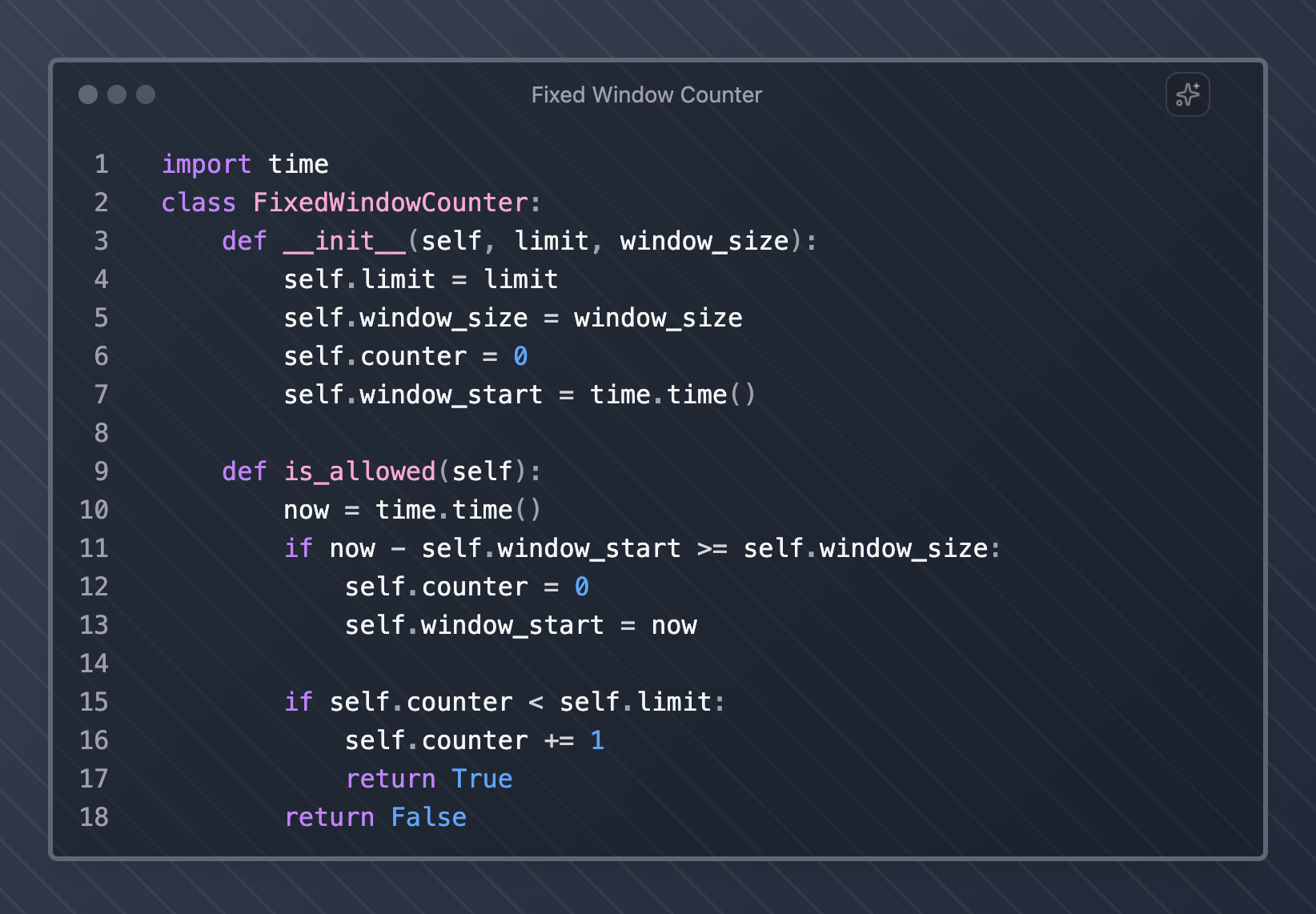
While simple to implement, this algorithm can allow twice the intended rate at window boundaries when users time their requests strategically.
Sliding Window Log
Sliding window log maintains a timestamp for each request within the current time window.
This approach provides precise rate limiting but requires more memory to store request logs.
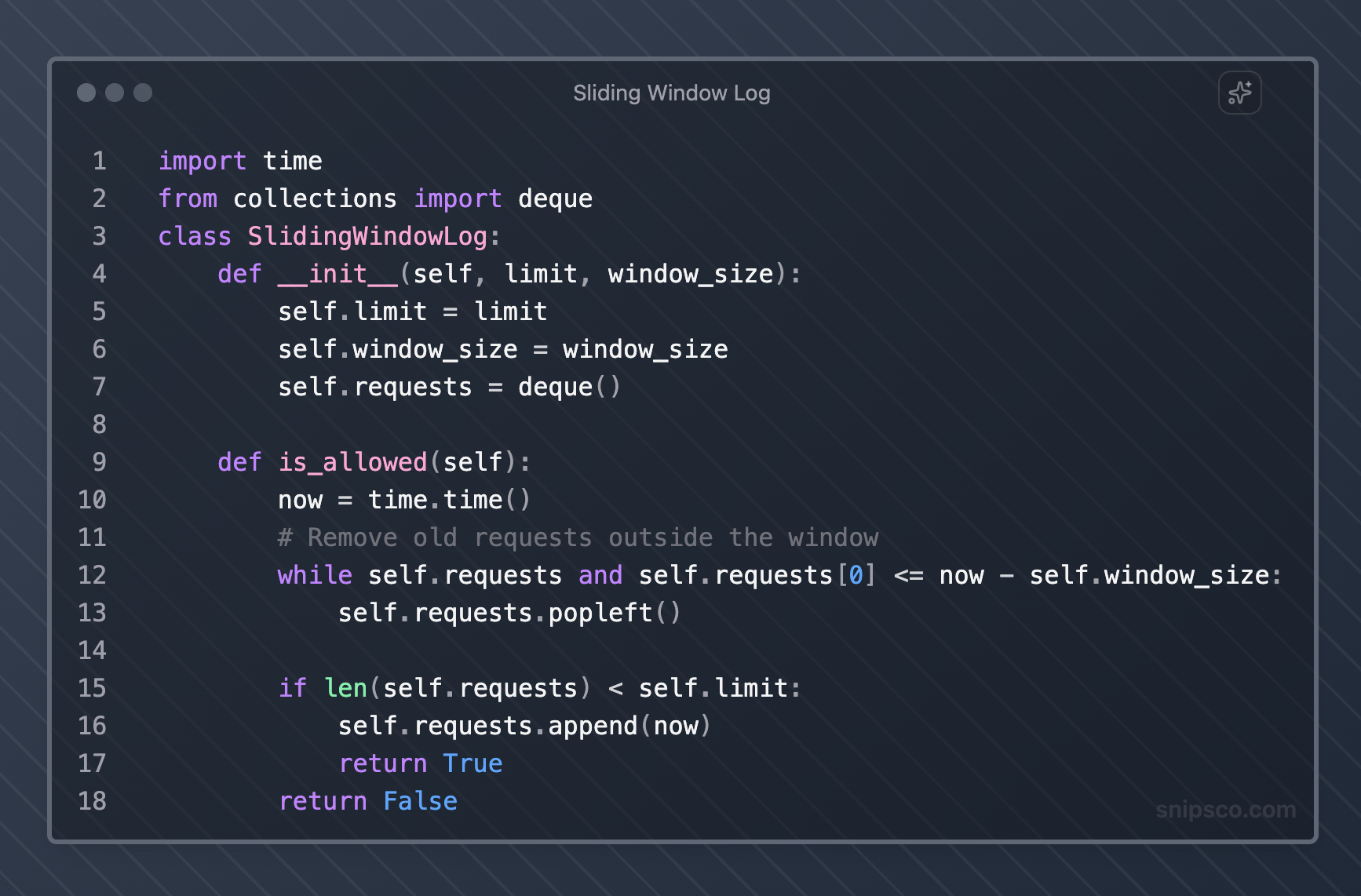
This method provides accurate rate limiting but may consume significant memory for high-traffic APIs.
Sliding Window Counter
The sliding window counter combines the simplicity of a fixed window with the accuracy of a sliding window.
It uses weighted counts from the current and previous windows to estimate the current rate.
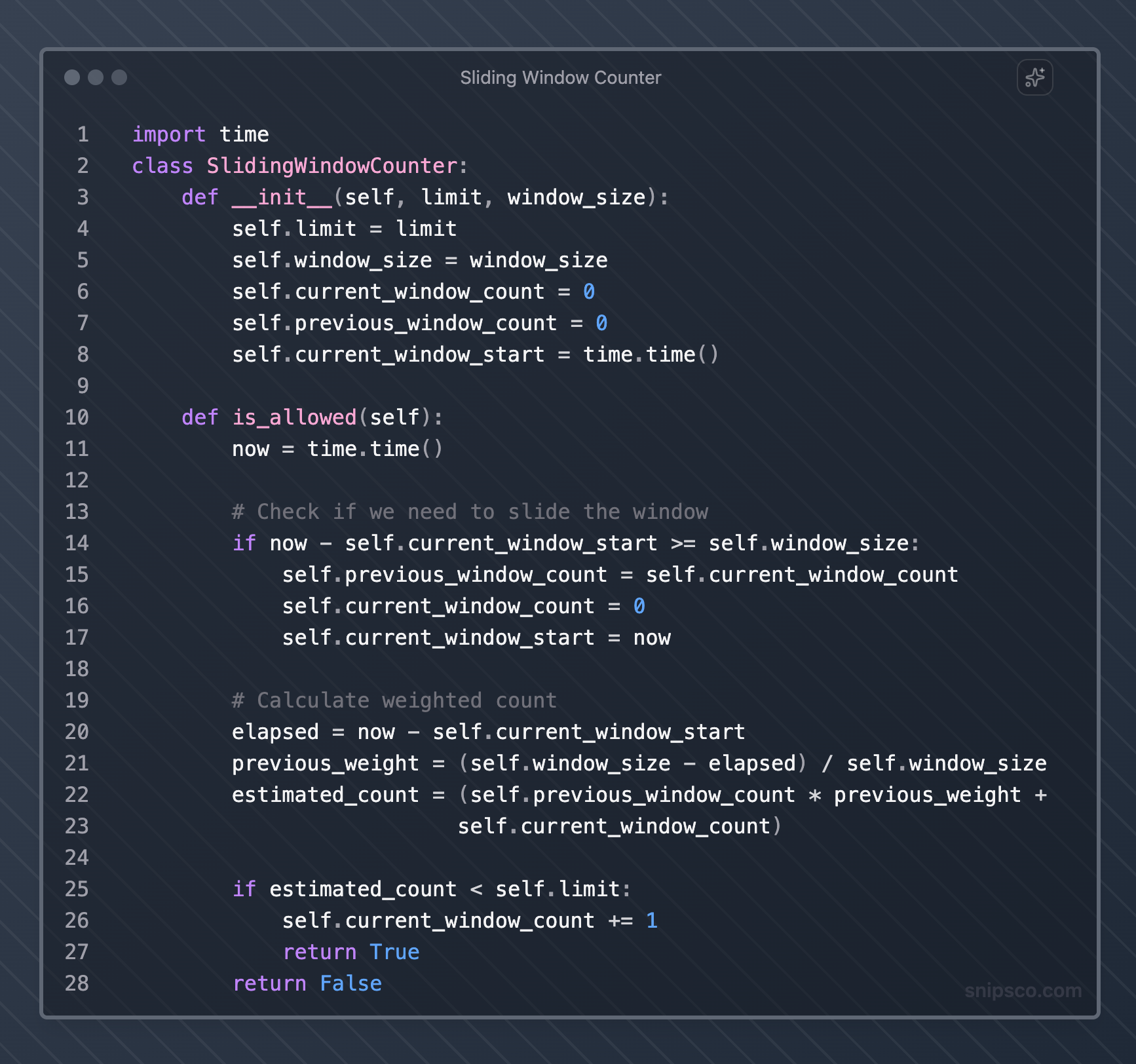
This approach balances accuracy with memory efficiency, making it suitable for most production environments.
Rate Limiting Implementation Strategies
Your implementation strategy depends on your architecture, scale requirements, and existing infrastructure.
Application-Level Rate Limiting
Implement rate limiting directly in your application code. This approach gives you complete control but requires careful coordination across multiple application instances.
Reverse Proxy Rate Limiting
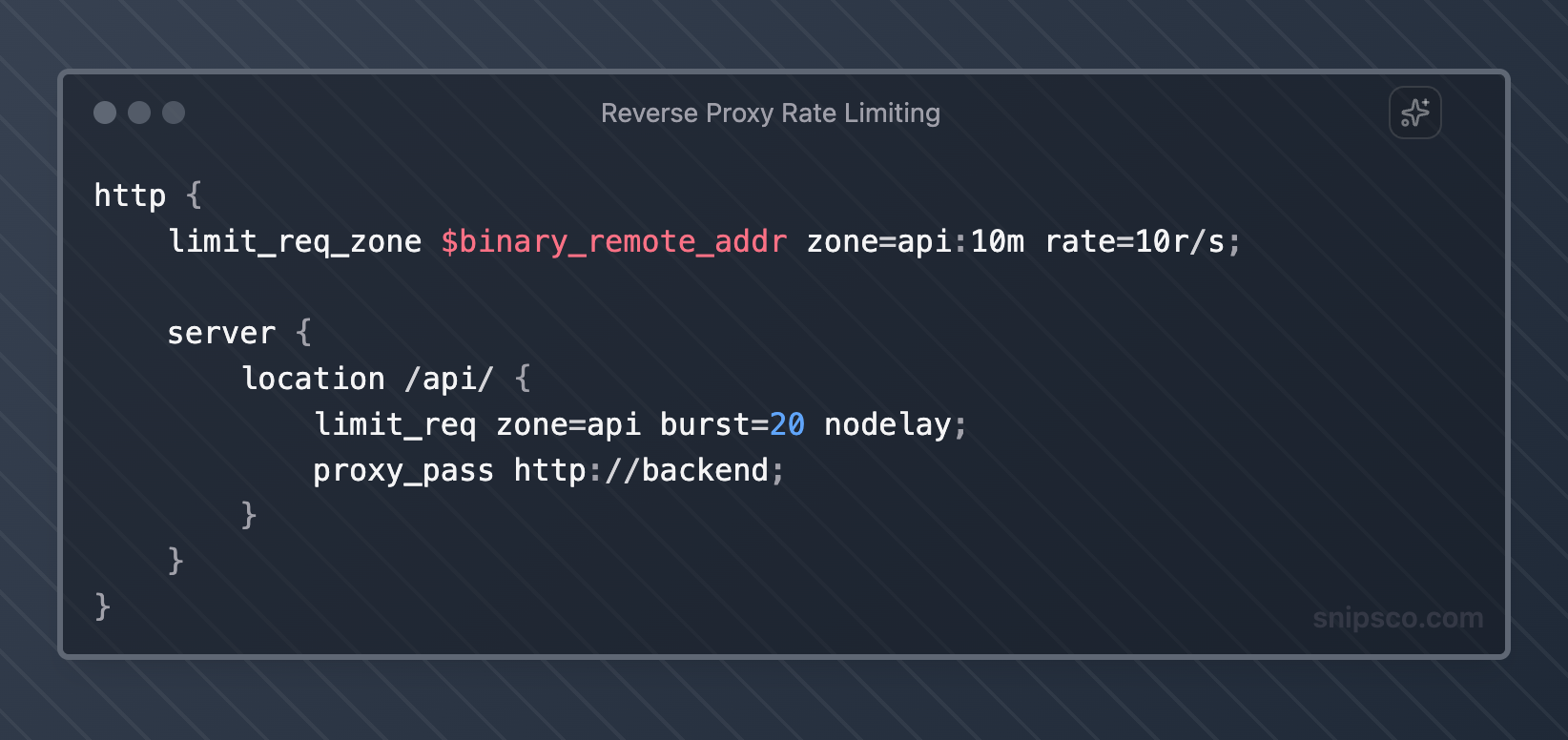
Use reverse proxies like Nginx, HAProxy, or cloud load balancers to handle rate limiting. This offloads processing from your application servers and provides centralized control.
API Gateway Rate Limiting
Modern API gateways such as AWS API Gateway, Kong, and Zuul provide built-in rate-limiting features with minimal configuration.
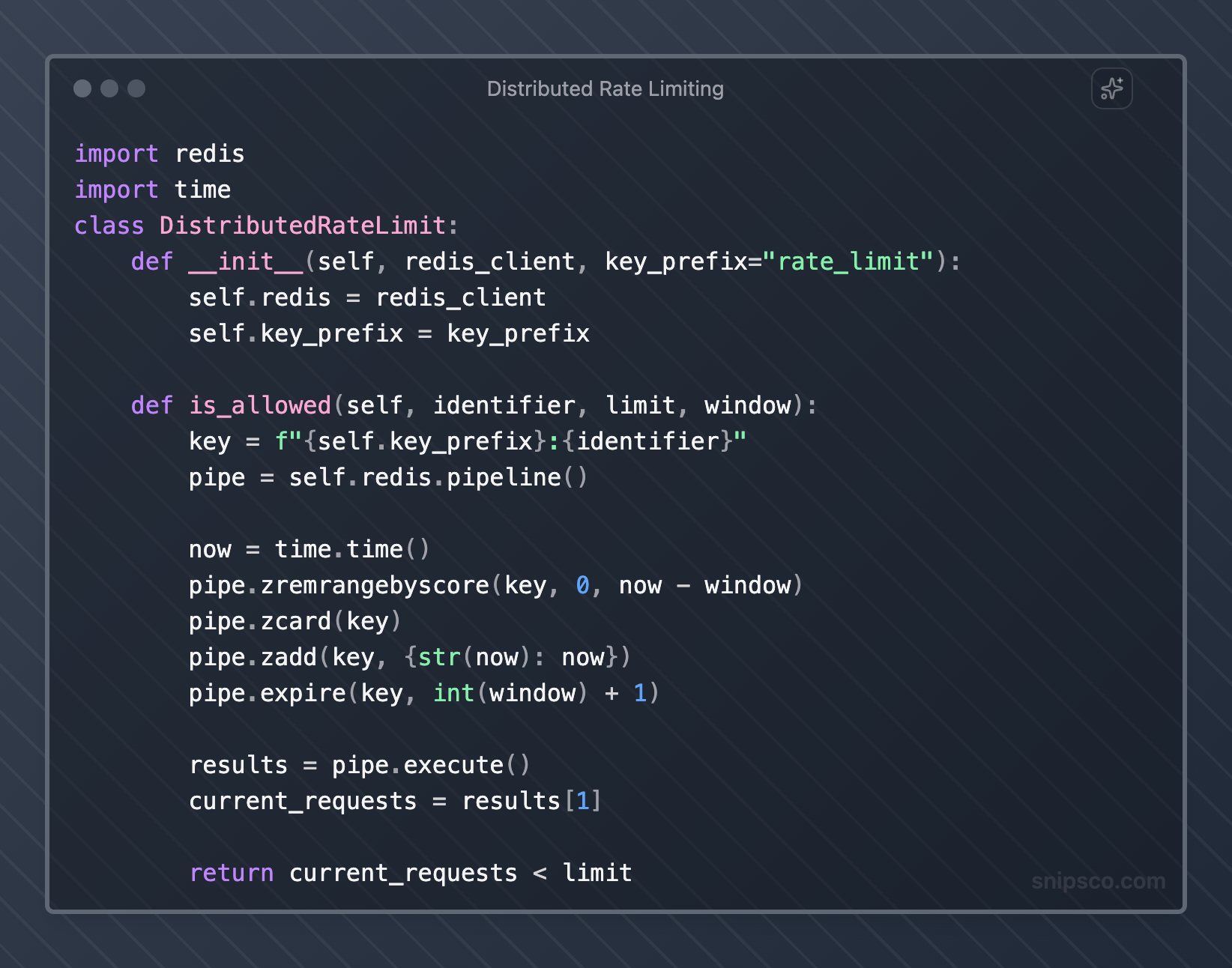
Distributed Rate Limiting
For high-scale applications, use distributed systems such as Redis or dedicated rate-limiting services to coordinate limits across multiple servers.
Rate Limiting Best Practices
Effective rate limiting requires careful consideration of user experience, system performance, and business requirements.
Set Appropriate Limits
Base your rate limits on actual usage patterns and system capacity. Monitor your API to understand typical request volumes and set limits that accommodate normal usage while preventing abuse.
Start with generous limits and gradually tighten them based on observed behavior. Different endpoints may require different limits based on their computational cost and business importance.
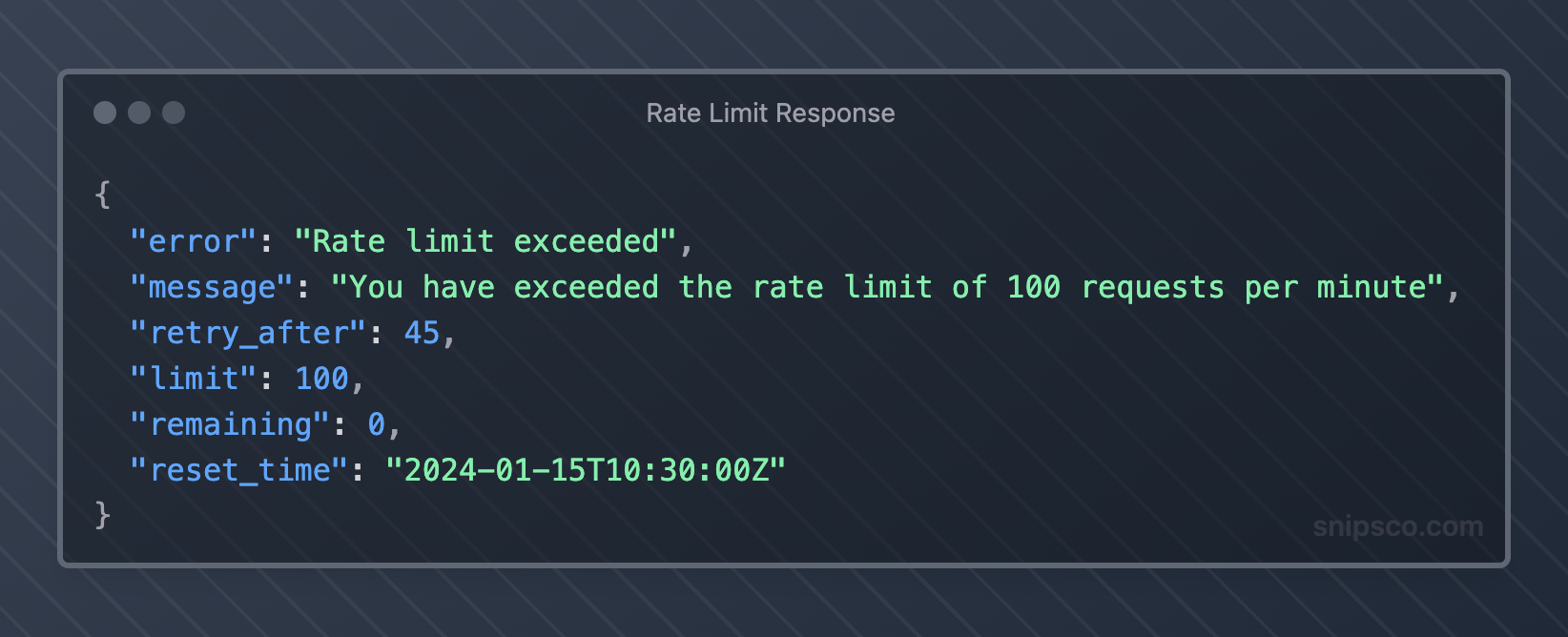
Provide Clear Error Messages
When rate limiting triggers, return informative error responses that help clients understand what happened and how to proceed.
Implement Graceful Degradation
Instead of hard rejections, consider implementing graceful degradation strategies. You might queue requests, reduce response detail, or redirect to cached versions during high load periods.
Use Multiple Rate Limiting Dimensions
Implement rate limiting across multiple dimensions for comprehensive protection:
- Per API key or user account
- Per IP address for unauthenticated requests
- Per endpoint based on resource intensity
- Global limits to protect the overall system capacity
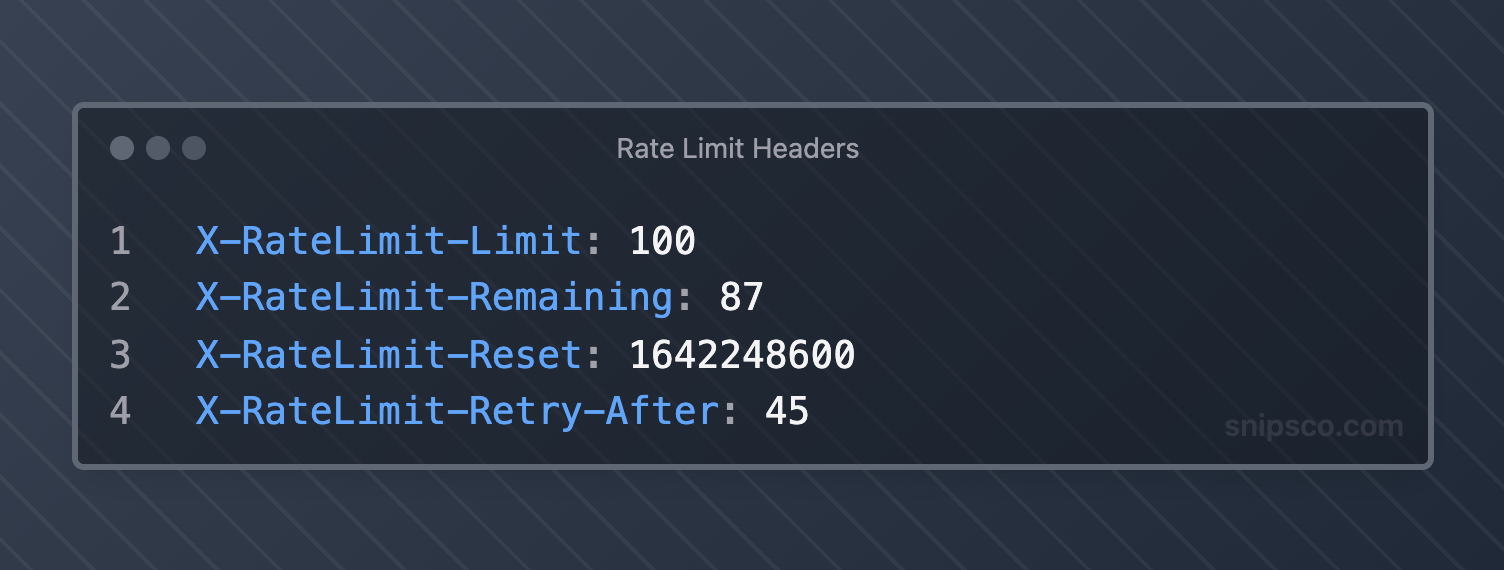
Include Rate Limit Headers
Always include rate-limiting information in response headers to help clients manage their request patterns effectively.
Plan for Burst Traffic
Design your rate limiting to handle legitimate burst traffic while still protecting against abuse. Token bucket algorithms work well for this scenario.
Monitor and Alert
Set up monitoring and alerting for rate-limiting metrics. Track rejection rates, client behavior patterns, and system performance to identify issues early.
Companies like Zipitly (zipitly.com) demonstrate how proper API rate limiting integrates with customer support workflows.
Their AI-powered support system needs to handle varying request volumes while maintaining responsive service for customer inquiries and automated ticket processing.
API Throttling vs Rate Limiting
While often used interchangeably, API throttling and rate limiting differ in implementation and behavior.
Rate Limiting
Rate limiting typically involves hard limits with binary allow/deny decisions. When limits are exceeded, requests get rejected immediately with error responses.
API Throttling
API throttling introduces delays or queuing to slow down request processing rather than rejecting requests outright. This approach can provide a better user experience for legitimate traffic spikes.
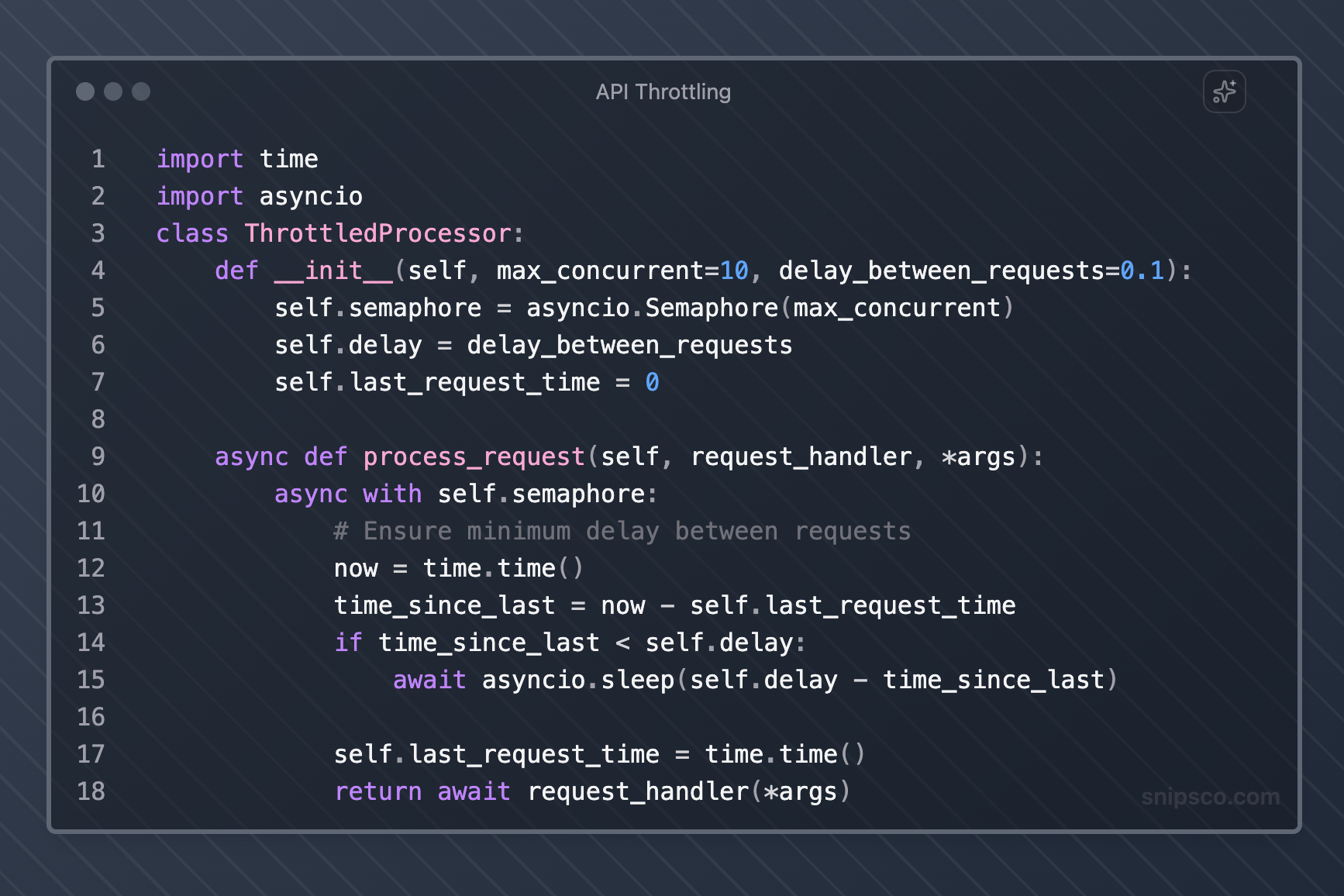
Choose rate limiting for strict resource protection and throttling for improved user experience during temporary load spikes.
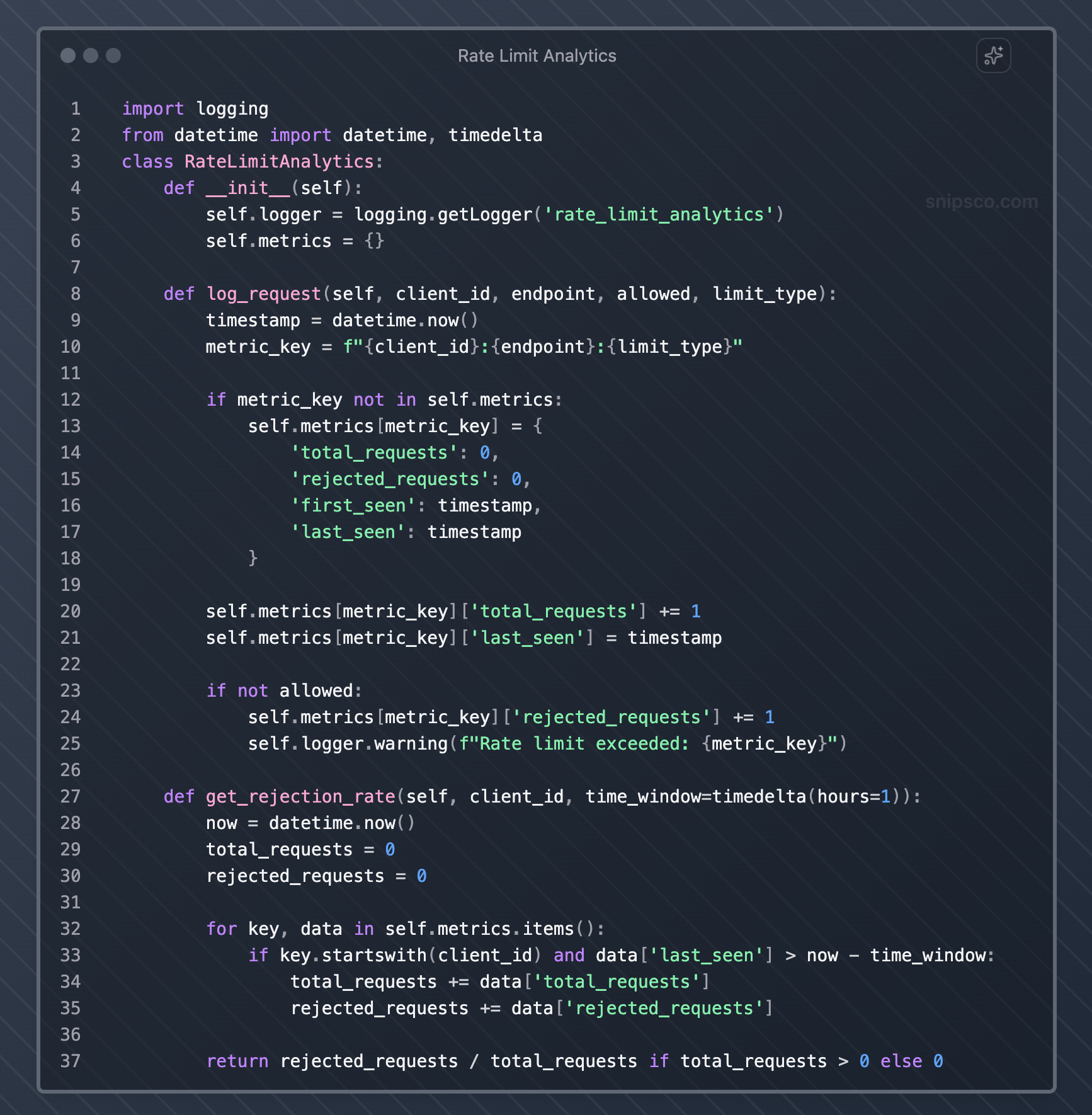
Monitoring and Analytics
Effective rate limiting requires continuous monitoring and analysis to optimize performance and user experience.
Key Metrics to Track
Monitor request patterns, rejection rates, and system performance to identify optimization opportunities:
- Total requests per time period
- Rate limit violations by client and endpoint
- Average response times under different load conditions
- Client retry behavior after rate limit hits
- System resource utilization during peak traffic
Alerting Strategies
Set up alerts for unusual patterns that might indicate attacks or system issues:
- Sudden spikes in rate limit violations
- High rejection rates from specific clients or IP ranges
- Unusual request patterns that might indicate bot activity
- System performance degradation despite rate limiting
Analytics for Optimization
Use rate-limiting data to optimize your API design and business strategies:
- Identify popular endpoints that might need caching or optimization
- Understand client usage patterns to inform pricing tiers
- Detect potential integration issues with partner applications
- Plan capacity based on growth trends
Common Pitfalls to Avoid
Learning from common rate-limiting mistakes can save you significant debugging time and user frustration.
Inconsistent Rate Limiting Across Services
When running microservices, ensure rate-limiting policies remain consistent across all services. Inconsistent limits can create confusing user experiences and make debugging difficult.
Ignoring Legitimate Burst Traffic
Don't set rate limits so strictly that they interfere with legitimate use cases. Consider scenarios like batch processing, data synchronization, or user-triggered bulk operations.
Poor Error Handling
Avoid generic error messages that don't help users understand how to resolve rate-limiting issues. Always include retry timing information and current limit status.
Memory Leaks in Rate Limiting Logic
Be careful with sliding window implementations that store request timestamps. Implement proper cleanup mechanisms to prevent memory leaks from accumulating request data.
Not Considering Distributed Environments
If your application runs across multiple servers, ensure your rate limiting works correctly in distributed scenarios. Local rate limiting can allow higher aggregate rates than intended.
Hardcoded Rate Limits
Make rate limits configurable rather than hardcoding them. This flexibility allows you to adjust limits based on changing requirements without code deployments.
Ignoring Client Feedback
Monitor how clients respond to rate limiting. High retry rates might indicate limits are too strict, while low API adoption might suggest limits are confusing or poorly documented.
FAQs
What is the difference between API rate limiting and API throttling?
Rate limiting typically involves hard limits with binary allow/deny decisions, rejecting requests when limits are exceeded.
API throttling introduces delays or queuing to slow down request processing rather than rejecting requests outright.
Throttling can improve the user experience during temporary traffic spikes, while rate limiting provides stricter resource protection.
Which rate-limiting algorithm should I choose for my API?
The choice depends on your specific requirements.
Token bucket works well for APIs that need to handle bursty traffic while maintaining average-rate control.
A fixed window counter is simple but can allow rate limit bypassing at window boundaries.
A sliding window log provides precise limiting but uses more memory.
For most applications, the sliding window counter offers a good balance of accuracy and efficiency.
How do I set appropriate rate limits for my API?
Start by analyzing your current traffic patterns and system capacity. Set initial limits generously and monitor actual usage to identify normal patterns.
Consider different limits for different endpoints based on their computational cost.
Factor in legitimate use cases like batch processing or data synchronization. Gradually adjust limits based on observed behavior and system performance.
Should I implement rate limiting at the application level or use a reverse proxy?
This depends on your architecture and requirements.
Application-level rate limiting gives you complete control and can consider business logic, but requires coordination across multiple instances.
Reverse proxy rate limiting offloads processing and provides centralized control, but may be less flexible.
Many organizations use a combination, with basic protection at the proxy level and sophisticated business logic rate limiting in the application.
How do I handle rate limiting in a distributed system?
Use a shared data store like Redis to coordinate rate limiting across multiple servers.
Implement distributed rate-limiting algorithms that account for network latency and potential inconsistencies.
Consider using dedicated rate-limiting services or API gateways that handle distribution automatically.
Monitor aggregate rates across all instances to ensure your limits work as intended.
What information should I include in rate limit error responses?
Always include the current limit, remaining requests, reset time, and retry-after headers.
Provide clear error messages explaining what happened and how to proceed.
Include documentation links for rate-limiting policies.
Consider adding contact information for users who need higher limits for legitimate use cases.
How do I monitor and optimize my rate-limiting strategy?
Track key metrics like total requests, rejection rates by client and endpoint, retry patterns, and system performance.
Set up alerts for unusual patterns that might indicate attacks or configuration issues.
Use analytics to identify optimization opportunities, such as endpoints that need caching or clients that might benefit from higher limits.
Regularly review and adjust limits in response to changing usage patterns and business requirements.
Remember that rate limiting is not a one-size-fits-all solution.
Your implementation should reflect your specific requirements, user patterns, and business goals.
Start with simple approaches and evolve your strategy based on real-world usage and feedback.